Listen without end
A recipe starts playing at once, and before the queue runs out MixRule adds the next batch by itself. Nothing repeats within a session.
 MixRule.
For iPhone, Mac and the car. With Apple Music.
Choose artists and set the rules. MixRule plays from their complete Apple Music discographies — right away, endlessly and without repeats. Or it builds a finished mix you can come back to.
iPhone · CarPlay · Mac · Web
A recipe starts playing at once, and before the queue runs out MixRule adds the next batch by itself. Nothing repeats within a session.
Artists, proportions, years, recording versions, a time limit and exclusions. You see right away how many tracks and minutes you will get.
Tracks from complete Apple Music discographies, not just the biggest hits. The same song on several releases counts once.
MixRule on iPhone
Three short recordings of the real app: listening to a recipe, building a recipe and a finished mix.
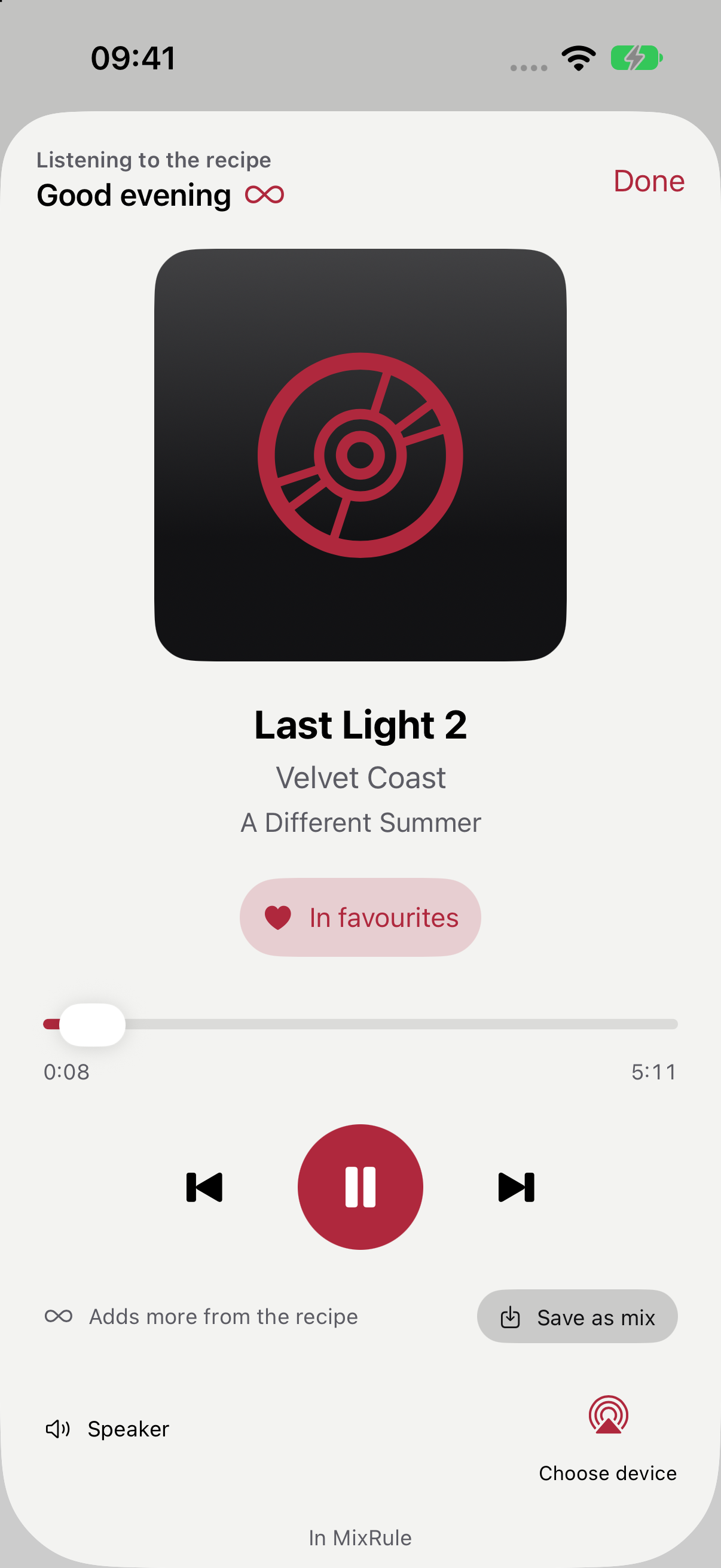
One tap and the recipe plays. The heart adds a track to your favourites. When the queue runs low, MixRule adds a batch by itself — here the up-next list grows from 14 to 21 tracks.
Add an artist, set a one-hour limit and leave out acoustic and a cappella versions. The batch line shows right away how many tracks and minutes you will get. A new block narrows the years.
Build a mix, pin the track you want to keep and draw the rest again. The saved mix waits in your Collection, and a saved recipe plays with one button.
Recorded in the iPhone simulator · fictional artists · no sound
Features
A recipe plays at once and adds new batches when fewer than 3 tracks or about 20 minutes are left. Within a session no recording returns and no artist plays twice in a row.
MixRule downloads your artists’ complete Apple Music discographies in the background and refreshes them daily, so new albums reach your mixes the next day.
Import your favourite artists from Apple Music or find an artist in the catalogue. New favourites are added every few hours; artists you removed stay removed.
A block adds artists Apple Music considers similar — only ones not on your list — and draws their tracks from their Top N. Like one? Keep them for good.
An artist’s most popular tracks in your Apple Music region, for example 3 tracks from the Top 10.
Period, recording type, album variety, period balance, weighted groups, logical conditions, permanent exclusions and exceptions for single artists, including their albums.
One switch leaves out remasters, deluxe editions, instrumental and karaoke, acoustic and unplugged, or a cappella versions. The time limit moves in 15-minute steps.
MixRule remembers recent mixes and tracks played in Listen. It can leave them out or just pick them less often.
Pin the tracks you want to keep, swap a single track or draw a new variant. The report explains anything that fell short.
The heart in the player, in a track’s menu and in CarPlay saves a track to your favourites (up to 500). The Favourites block adds a few of them to every mix and batch.
Recipes, saved mixes and recent listening on the car screen. Tapping a recipe starts listening; Now Playing has the heart, saving a mix and the up-next list.
Recipes, saved mixes and history, each mix with a cover drawn from its recipe. With an account everything syncs across iPhone, Mac and the browser.
MixRule / Web
The web app complements MixRule. Build recipes and browse your collection in a browser when a bigger screen suits you. Music plays in the app on iPhone, Mac and CarPlay. The web app is in Polish for now.
Open the web app ↗Import your favourites from Apple Music or search the catalogue.
Tracks per artist, years, recording versions, a time limit and other blocks.
Listen plays the recipe without end. Build mix gives you a finished list to save in your Collection or in Apple Music.
Yes. MixRule is a native iPhone and Mac app with CarPlay support. The web app is for working on recipes and your collection; it does not play music.
Polish and English. On a device set to another language, MixRule runs in English. The web app is in Polish for now.
Yes. Playback, discographies and saving playlists need Apple Music access; MixRule does not provide a subscription. Your MixRule account is separate and only needed for sync.
Yes, with CarPlay. In the car you pick a recipe or a saved mix, and messages stay short and never send you to your phone.
From the Apple Music catalogue: your artists’ complete discographies, their Top in your region and similar artists. Until a discography has downloaded, the artist uses their Top 20.
A public iPhone download link is not available yet. The account for sync and the web app is created the first time you sign in with Apple.
MixRule
A public iPhone download link is not available yet. The account for sync and the web app is created the first time you sign in with Apple.